
1 Quick Start
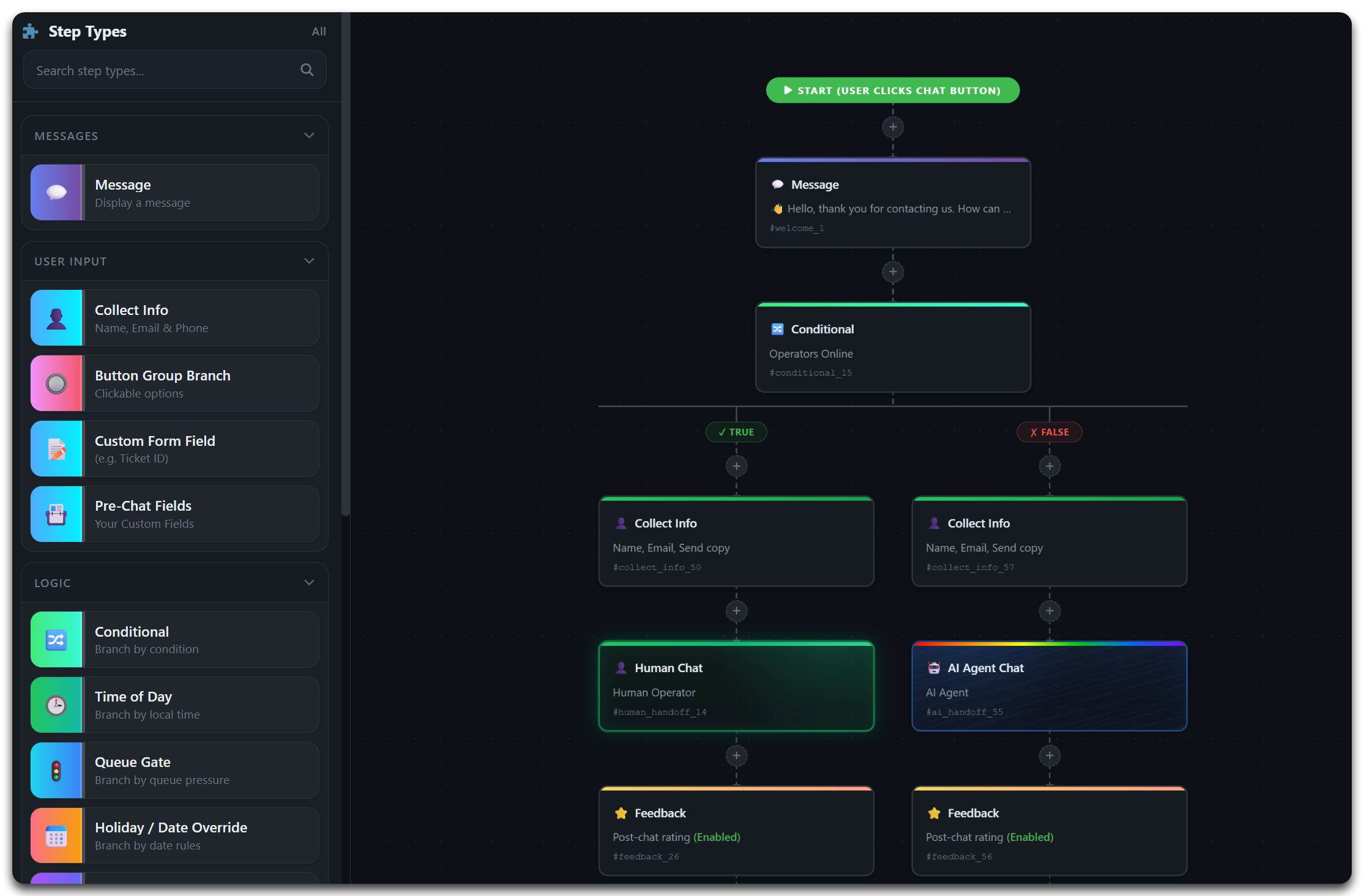
A workflow is a conversational journey made of modules (also called nodes or steps). You connect them on a visual canvas, preview the result, and publish — no code required. Here is the fastest path to your first live workflow.
2 Setup & Activation
Prerequisites
- Admin access with permission to manage workflows.
- The Flow Widget embed script installed on your website (see the installation guide).
- At least one active department/operator or a configured AI agent path.
Recommended build sequence
message introduction that sets expectations.collect info / form_field / api_form.conditional, time_of_day, queue_gate or language_router.ai_handoff, human_handoff or capture an offline_message.feedback and optional webhook follow-ups.3 Anatomy of a Workflow
Every workflow is built from a handful of repeating concepts. Understand these five and the 30+ modules will all feel familiar.
Start point
Where the conversation begins the moment the widget opens. Usually a Message node.
Modules (nodes)
The building blocks — each does one job: send a message, collect data, branch, hand off, or call an API.
Connectors
Arrows that define the order of steps. Branching modules expose more than one output to connect.
Variables
Data captured earlier (name, email, API responses) reused later with {{variable}} placeholders.
Outcomes
Where a branch ends — a live agent, the AI agent, an offline message, or a closing confirmation.
4 Workflow Settings
These root settings apply to the whole workflow. Configure them once before you go live.
| Setting | Purpose | Recommended |
|---|---|---|
enable_auto_restart |
Restarts the flow automatically when a session completes or ends. | On for public support journeys. |
session_timeout_minutes |
How long an inactive session stays open before resetting. | 20–45 min by complexity. |
require_csrf |
Enforces CSRF validation on state-changing steps (forms, API calls). | On in production. |
log_analytics |
Tracks viewed / completed / abandoned steps for reporting. | On — powers optimisation. |
Once live, review your numbers in the Reporting & Analytics platform to find drop-off points and improve each branch.
5 AI & Hybrid Routing
The real power of the builder is blending automation with people. Drop an AI agent into any branch for instant 24/7 answers, then escalate to a human the moment empathy or authority is needed. Explore the dedicated AI features below.
Hybrid AI Chat Workflows
The full feature overview with 5 real, ready-to-build workflow patterns.
Explore featureRAG AI Agent Knowledge
Train the AI agent on your docs, FAQs and site so it answers accurately from your content.
How the AI learnsAI Tool Integrations
Give the AI agent tools — order lookups, bookings, password resets — via your APIs.
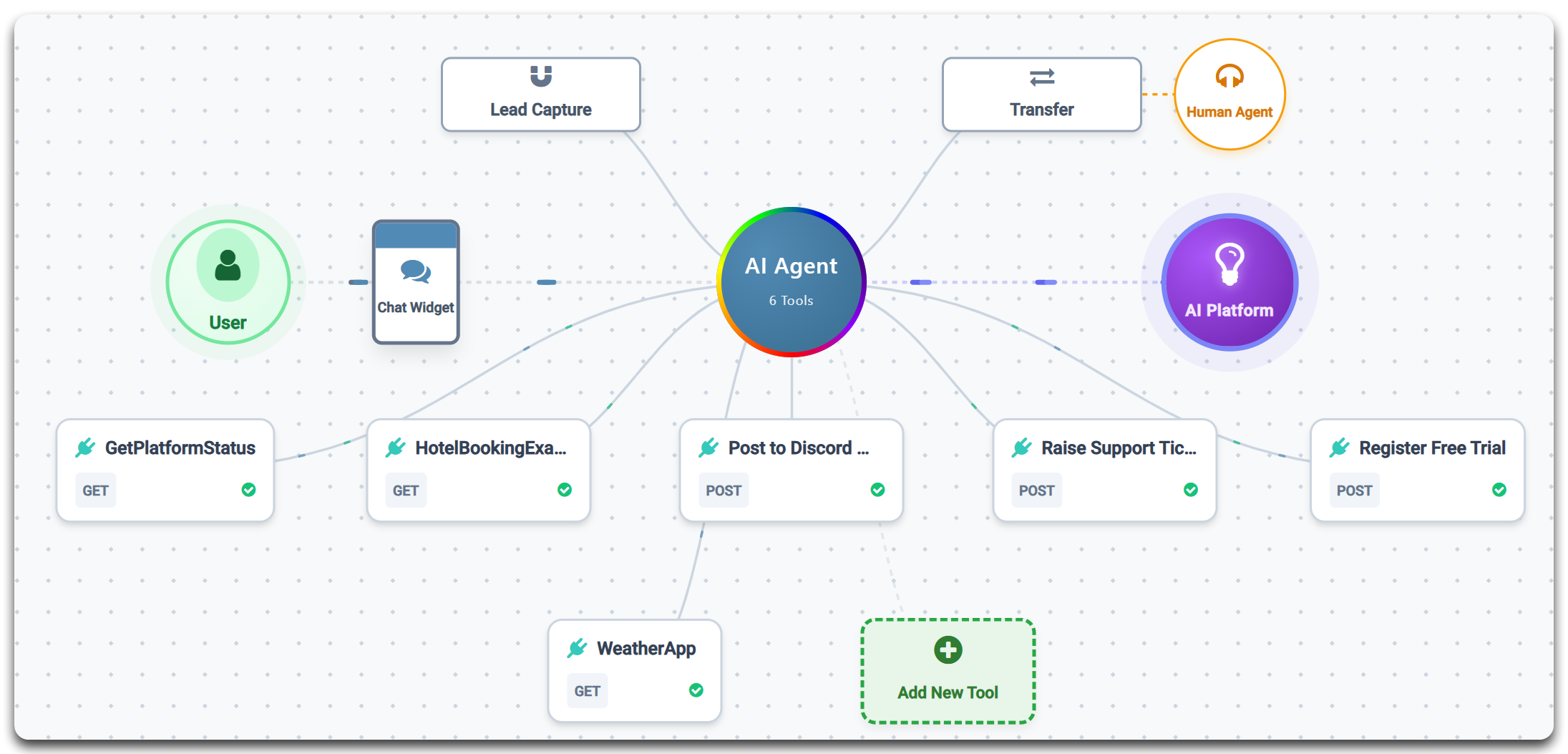
See AI toolsThe AI modules you’ll use most in a workflow:
6 Every Module, Explained
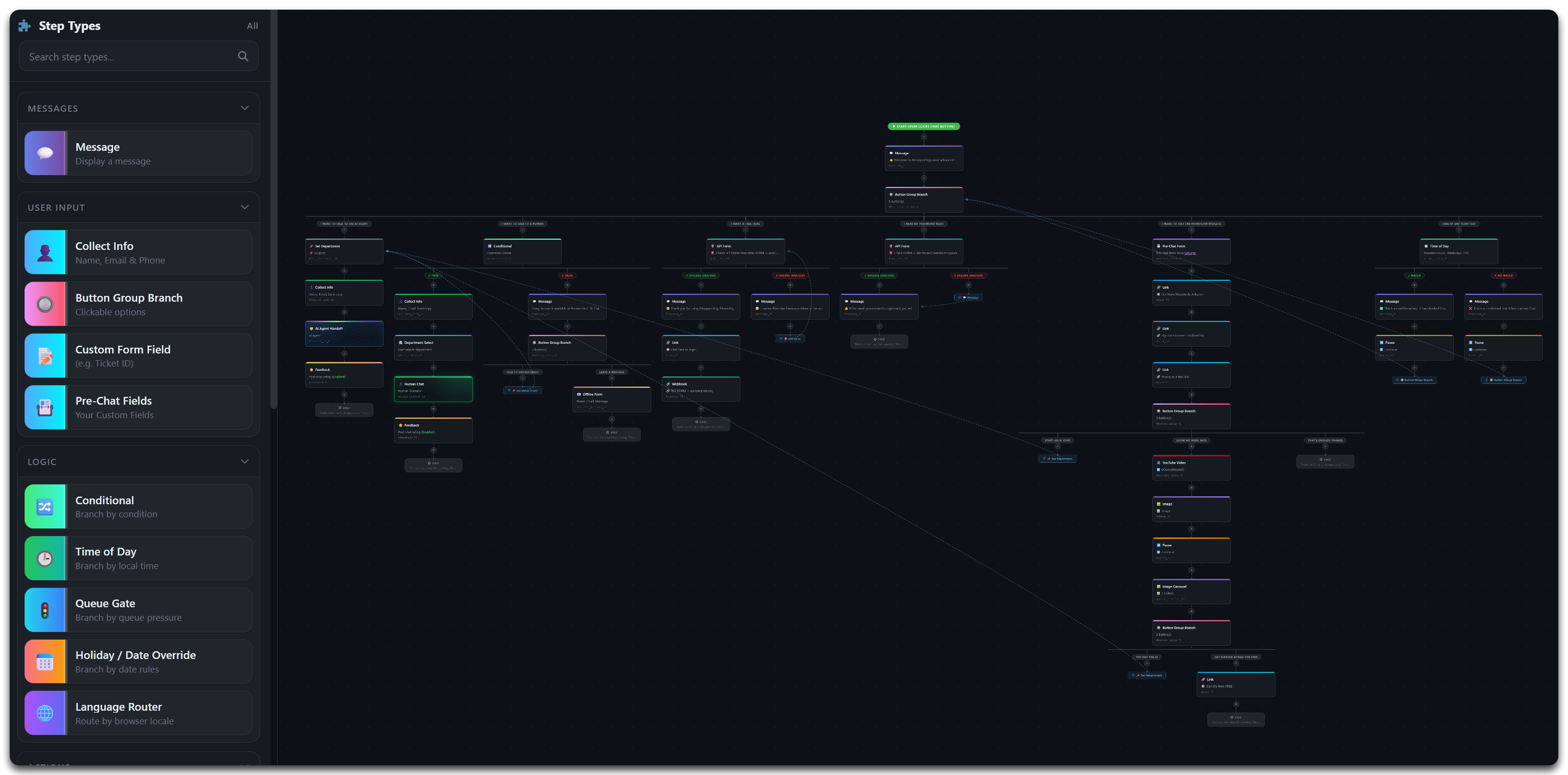
Below is every module in the builder, grouped by category. Each card covers what it does, how it works, and a real example — with a link to its full reference page. You can also browse the visual Module Library.
Messages & Input
Message
What it does: Sends a text message, greeting, instruction or confirmation to the visitor.
How it works: Output-only — it displays instantly and moves on. Personalise with {{name}} from earlier steps.
Example: A law firm greets visitors and sets response-time expectations before intake.
Full guideCollect Info
What it does: Gathers name, email, phone and custom fields conversationally.
How it works: Asks one field at a time with real-time validation; values become reusable variables.
Example: A helpdesk captures name & email before connecting to an agent so context carries over.
Full guideButton Group
What it does: Presents one-tap choices and branches the flow by the visitor’s selection.
How it works: Each button has a label, value and its own next step — perfect for intent capture.
Example: A council routes residents to Bins, Housing, Roads or Payments in a single tap.
Full guideCustom Form Field
What it does: Asks a single validated field of any type — text, dropdown, date, number.
How it works: Set field name, type, required flag and a validation regex with a custom error message.
Example: A hotel asks for a booking reference (validated format) before concierge handoff.
Full guidePre-Chat Form
What it does: Collects several essential details in one form before live chat begins.
How it works: Bundles multiple fields into a single step so agents start with full context.
Example: A B2B SaaS gathers name, company and plan before opening a sales chat.
Full guideLogic & Branching
Conditional
What it does: Branches the flow based on workflow/session data or captured values.
How it works: Pick a condition and connect its true and false outputs to different steps.
Example: A finance site branches on whether the visitor already has an account.
Full guideTime of Day
What it does: Routes by local office hours and day of week.
How it works: Set a timezone, days and a business/custom window; route the open and closed paths separately.
Example: Police digital contact uses live handoff in-hours and secure message intake out-of-hours.
Full guideQueue Gate
What it does: Routes based on real-time queue load and agent availability.
How it works: Compares waiting visitors against a threshold and sends overflow down a fallback path.
Example: E-commerce sends overflow to an AI-first path when the queue exceeds 5 waiting.
Full guideHoliday Override
What it does: Overrides normal routing on specific dates — bank holidays, closures, special hours.
How it works: Match a date, range or recurring days in a timezone, then branch to a closure path.
Example: A legal firm switches to a callback-request path on public holidays.
Full guideLanguage Router
What it does: Routes by detected browser locale or visitor choice.
How it works: Define a routes array per language with a default fallback route.
Example: A travel brand sends English, Spanish and French visitors to dedicated teams.
Full guidePage Match
What it does: Routes based on the page URL the visitor is browsing.
How it works: Match a path or pattern (e.g. /pricing) and branch to a contextual flow.
Example: Visitors on the pricing page get a sales-led flow; everyone else gets support.
Full guideAPI Conditional
What it does: Calls an external API, then branches on the response.
How it works: Set the endpoint, a response path (e.g. data.isEligible), an operator and expected value.
Example: Finance validates a customer reference, then routes verified users to specialist support.
Full guideHandoffs & Routing
AI Agent Chat
What it does: Hands the conversation to your trained AI agent for instant 24/7 answers.
How it works: The agent answers from your RAG knowledge base and can use tools to act.
Example: A hotel answers booking and facilities questions instantly, around the clock.
Full guideHuman Live Chat
What it does: Transfers the visitor to a live operator with full context.
How it works: Targets a department/queue and passes the transcript and captured data to the agent.
Example: A finance firm routes complaint escalations straight to accredited staff.
Full guideAI → Human Escalation
What it does: Starts with AI, then escalates to a live agent when needed.
How it works: When the visitor asks for a person — or the AI can’t resolve it — the flow checks availability and transfers seamlessly.
Example: A council answers FAQs with AI and escalates complex cases to operators with the AI transcript attached.
Full guideDepartment Select
What it does: Lets the visitor pick a department, with online/offline status shown.
How it works: Offline teams are greyed out; selection routes to the correct queue.
Example: A hotel offers Reservations, Existing Booking and Events teams.
Full guideSet Department
What it does: Silently assigns a department from workflow logic — no visitor interaction.
How it works: Hard-routes based on page or campaign context before a handoff.
Example: Pricing-page traffic is auto-assigned to Sales specialists.
Full guideContent & Media
Link Node
What it does: Shares a clickable link to a page, policy, payment or resource.
How it works: Set label, URL and target; the chat stays open so the journey continues.
Example: A council shares its self-service portal while keeping the chat path live.
Full guideImage Display
What it does: Shows a product photo, screenshot, diagram or visual instruction inline.
How it works: Supply an image URL and alt text; it renders directly in the chat.
Example: An IT helpdesk shows a labelled screenshot of where to find a setting.
Full guideGIF Animation
What it does: Plays an animated GIF for celebrations, demos and personality.
How it works: Drop in a GIF URL; it autoplays in a chat bubble.
Example: A SaaS celebrates a completed sign-up with a confetti GIF.
Full guideYouTube Video
What it does: Embeds a YouTube video — tutorial, demo or explainer — in chat.
How it works: Paste the video URL; it plays inline without leaving the page.
Example: A SaaS onboarding flow plays a 60-second setup video then routes to support.
Full guideImage Carousel
What it does: Displays a swipeable gallery of images.
How it works: Add multiple images with captions; visitors swipe through them.
Example: A hotel showcases room types in a carousel before booking.
Full guideIntegrations
Webhook
What it does: Sends collected data to an external system via a server-side POST.
How it works: Set URL, auth, payload mapping and retry policy; fire it after capture.
Example: A council pushes pothole reports straight into its case-management queue and pings Slack.
Full guideAPI Form
What it does: Collects fields conversationally, submits to your API, and shows the response.
How it works: Map fields to the endpoint; render the reply with a template like Your case ID is %id%.
Example: A hotel creates a reservation-callback record in its PMS during the chat.
Full guideEmail Form
What it does: Emails collected visitor data straight to your team.
How it works: Captures fields and sends a formatted email — no integration required.
Example: An estate agent emails new viewing requests to the branch inbox instantly.
Full guideFAQ Module
What it does: Shows searchable FAQ answers in chat to deflect repeat questions.
How it works: Present a list of questions; tapping one reveals the answer before any handoff.
Example: A support team answers “How do I cancel?” instantly, reducing agent load.
Full guideUtility & Flow Control
Pause / Delay
What it does: Adds a natural pause between messages.
How it works: Set a delay (e.g. 1.5s) to simulate typing and give reading time.
Example: A bot “types” for a moment before a long answer so it feels human.
Full guideClear Screen
What it does: Resets the visible chat display mid-workflow.
How it works: Clears prior bubbles to reduce clutter between conversation phases.
Example: After a long FAQ branch, the screen clears before starting a fresh handoff.
Full guideFeedback & Rating
What it does: Captures a satisfaction rating and optional comment at the end of a chat.
How it works: Choose a scale and whether comments/skip are allowed; results feed analytics.
Example: A legal intake team tracks satisfaction after the first response.
Full guideOffline Message
What it does: Captures a structured message when no agents are available.
How it works: Requires email, collects the message, and confirms receipt to prevent missed chats.
Example: A police non-emergency line captures incident details for next-shift review.
Full guide7 API Examples
Use these as templates for the Webhook, API Form and API Conditional modules.
A. Webhook payload (your server receives)
{
  "siteid": "1234567890",
  "workflow_id": 42,
  "jsSessionId": "session_abc123",
  "event": "workflow_completed",
  "data": {
    "visitor_name": "Alex Morgan",
    "visitor_email": "alex@example.com",
    "intent": "housing_enquiry"
  }
}
B. API Form response (your API returns)
{
  "success": true,
  "id": "CASE-10045",
  "username": "alex.m",
  "message": "Case created"
}
Response template in the module config: Your case ID is %id%.
C. API Conditional response
{
  "data": {
    "isEligible": true,
    "tier": "gold"
  }
}
Config: response_path: data.isEligible · operator: eq · expected_value: true
D. cURL test pattern
curl -X POST "https://example.com/api/check-ticket" \
  -H "Content-Type: application/json" \
  -H "X-API-Key: YOUR_KEY" \
  -d '{"ticket_id":"TICK-12345"}'
8 Industry Use Cases
Proven module combinations by sector. Each is a starting recipe — mix and match for your own flow.
Councils
message → button_group → collect_info → webhook → feedback
Triage service requests, collect address/reference, and push the case into your back-office queue.
Police 101
message → api_conditional → human_handoff / offline_message
Disclaimer, risk check, then priority live handoff or out-of-hours secure message capture.
Law Firms
form_field → conditional → set_department → human_handoff
Standardise intake, separate new vs existing clients, route by practice area.
Finance
api_conditional → queue_gate → ai_handoff / human_handoff
Verify the client, handle load, then AI for routine and specialists for the rest.
Hotels
language_router → button_group → api_form → dept_select
Greet in the right language, capture the request, route to the right desk.
E-Commerce
button_group → api_conditional → message / ai_handoff
Track orders and process returns via API, with AI for everything else.
9 Testing & QA Checklist
- Every branch has a valid destination — no dead-end steps.
- All required fields and regex rules tested with valid and invalid input.
- Each handoff path tested both in-hours and out-of-hours.
- Webhook/API auth works and errors are user-safe (no raw error text shown).
- Keyboard navigation, focus visibility, and clear labels throughout.
- Analytics logging
step_viewed/step_completed/abandonedcorrectly.
10 Troubleshooting
“No active workflow found”
Make sure exactly one workflow is set active for the site, and the Flow Widget embed script is present on your pages.
An API or webhook step fails
Re-check the endpoint URL, auth headers, timeout and the response JSON shape. Use the cURL pattern in API Examples to confirm the endpoint independently.
Routing goes the wrong way
Verify each branch’s connected target and the condition operator/value. For API Conditional, confirm the response_path matches the live JSON.
Offline path triggers during opening hours
Check the timezone and day filters on your Time of Day / Holiday Override modules — a mismatched timezone is the usual cause.
Low completion rate
Simplify early questions, add clearer button labels, and use transition messages before handoffs. Check analytics for the exact drop-off step.