See Who’s on Your Website.
Reach Out Before They Leave.

IMSupporting gives your operators a live dashboard of every website visitor — their current page, time on site, device, and location. Spot a high-intent visitor and send them a personalised chat invitation in seconds. They click Accept and a real conversation starts instantly.

  • No credit card
  • 30-day free trial
  • UK hosted
  • GDPR compliant
Higher conversion rate with proactive chat vs. reactive chat
82% Of visitors who accept a proactive invite make a purchase or enquiry
<5s Average time from clicking “Start Chat” to live conversation
24/7 Visitor visibility — never miss a high-intent visitor on your site

How Proactive Chat Works

Three simple steps from visitor spotted to conversation started — all in real time

Monitor Live Visitors

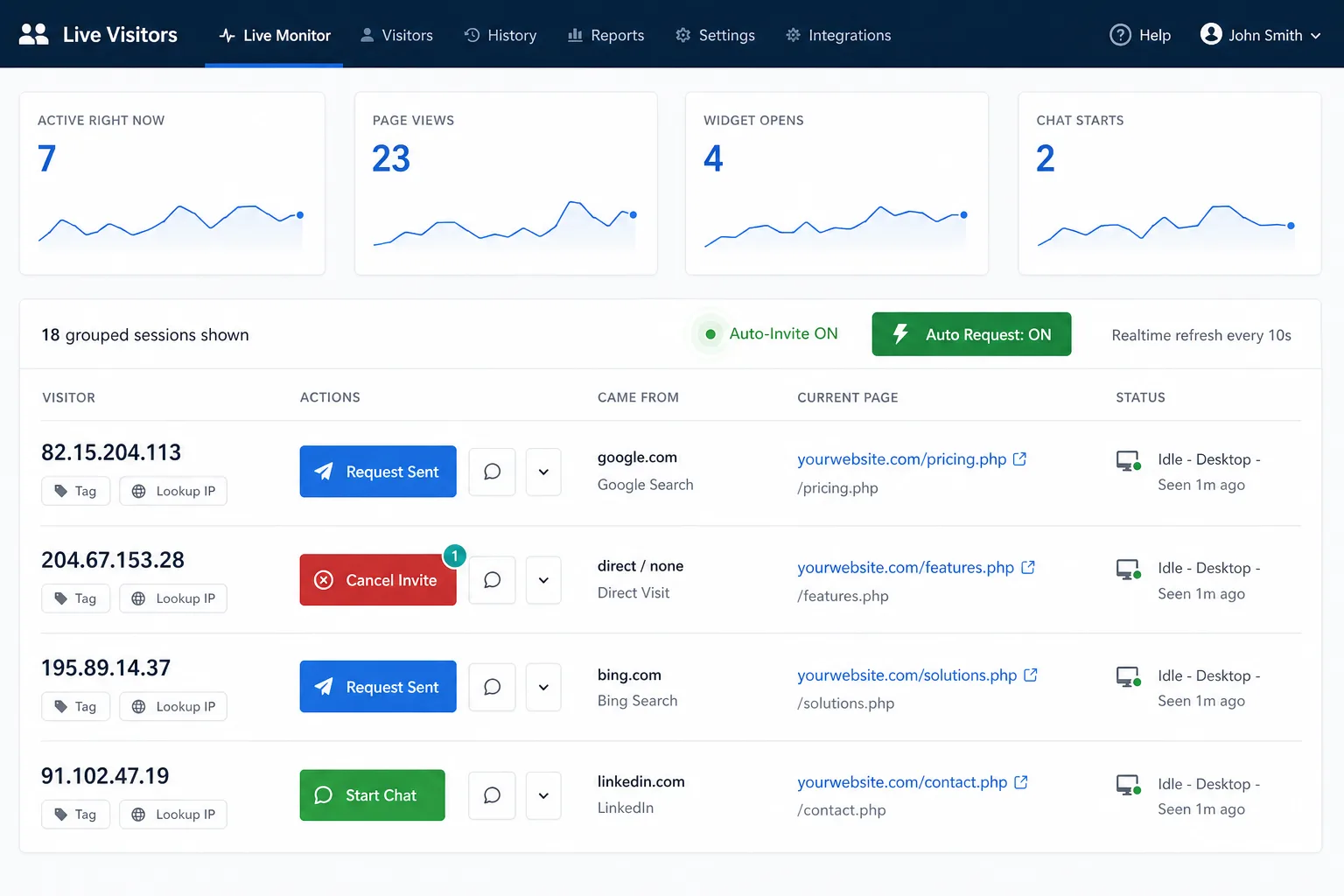
Your operator dashboard shows every active visitor on your website in real time — their current page, how long they’ve been browsing, their device type, IP location, and their online/quiet status. No setup needed; visibility starts the moment the chat widget loads.

  • Current page URL
  • Time on page & total session time
  • Desktop or mobile device
  • Online / Quiet status indicators
  • IP address & referrer source

Send a Chat Invitation

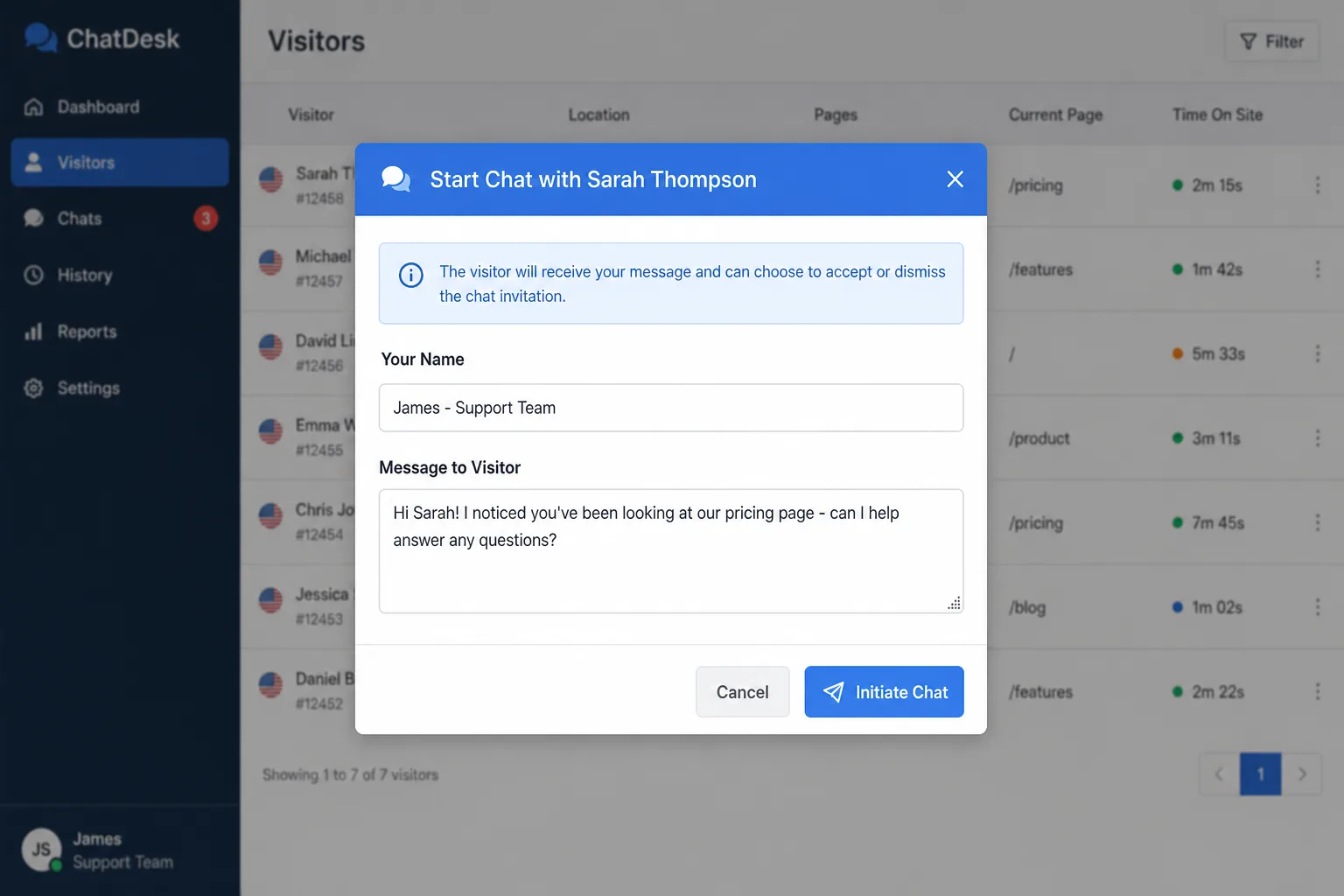
When an operator spots a visitor who needs help — maybe they’ve been on your pricing page for five minutes, or they keep returning to the same FAQ — the operator clicks Start Chat, types a personalised message, and sends a proactive invitation instantly.

  • Custom greeting message
  • Appears next to the chat bubble
  • Unobtrusive, non-intrusive design
  • Visitor can decline with one click
  • Operator sees delivery status live

Live Chat Begins

The visitor clicks Accept Chat and a normal live chat conversation begins immediately. The operator gets the full session context — what pages the visitor browsed, how long they spent on each, and any previously captured workflow data — so every conversation starts on the right foot.

  • Instant chat opens on accept
  • Full visitor browsing context
  • Standard chat features & tools
  • Auto-cancel if visitor navigates away
  • Transcript saved to dashboard

Your Live Visitor Dashboard

The visitor monitoring panel updates in real time, giving operators instant visibility of everyone browsing the site. Filter by online status, sort by time on page, and prioritise who to reach out to — all without leaving the dashboard.

Each visitor row shows their current URL, the page title, time on page, total session duration, device type, and whether they have the chat widget open. The Start Chat button is always one click away.

  • Real-time visitor presence — updates every few seconds
  • Referral source & IP lookup integrated
  • Tag visitors for follow-up or targeting
  • Desktop & mobile device identification
  • Previous visit & chat history accessible
Try Visitor Monitoring Free

IMSupporting real-time visitor monitoring dashboard showing live website visitors with their current page, time on site, device type, and Start Chat buttons
The live visitor monitor — see every active visitor, their page, device, and session length at a glance. Click to zoom.

The Perfect Chat Invitation

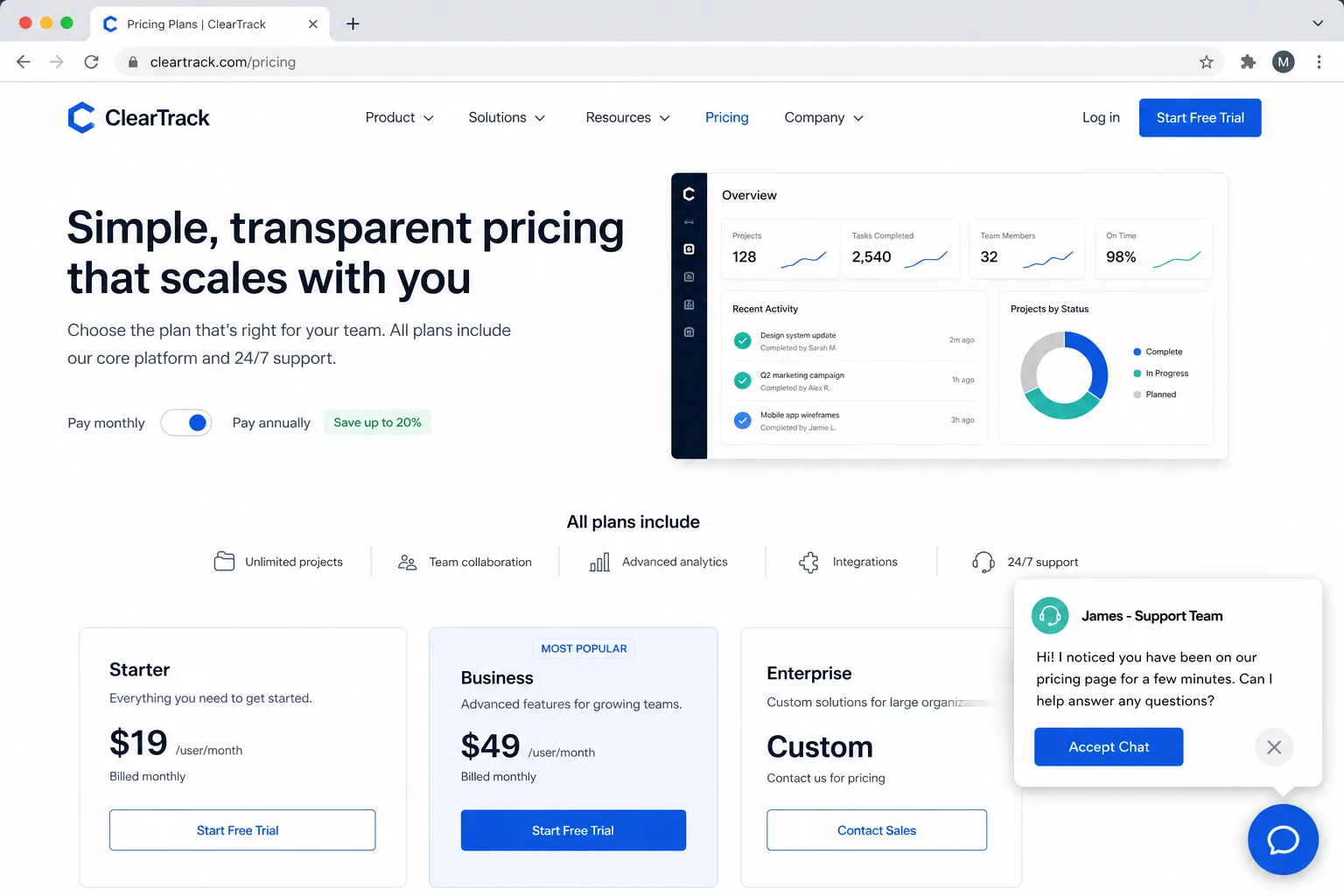
When an operator sends a proactive invite, the visitor sees a clean, unobtrusive popup appear next to the floating chat button. It shows the operator’s personalised greeting and two choices: Accept Chat or quietly dismiss it.

The invitation is designed to feel helpful, not pushy. It mirrors the style and colours of your existing chat widget, keeping your brand consistent. Visitors who dismiss the invite can still start a chat later themselves — their browsing experience is never disrupted.

  • Matches your widget’s brand colours & style
  • Operator types a custom, personal message
  • One-click dismiss — never annoying
  • Popup appears in under a second
  • Operator can cancel the invite before acceptance
See a Live Demo
A proactive chat invitation popup appearing next to the floating chat button on a website, showing a friendly greeting message and an Accept Chat button
The chat invitation popup — friendly, on-brand, and completely dismissable. Click to zoom.

From Visitor List to Live Conversation

The entire proactive chat journey — from spotting a visitor to typing a message to the live conversation beginning — takes under ten seconds. Operators never need to leave their dashboard to initiate, manage, or close a proactively started chat.

Once the visitor accepts, the chat window opens in your standard operator interface with the visitor’s browsing context pre-loaded. Operators see the pages visited, time spent, device info, and any relevant tags — all before typing their first message.

  • Visitor browsing history pre-loaded in chat
  • Normal live chat tools & canned responses available
  • Chat transcript saved automatically
  • Proactive invite stats in your analytics
  • Multiple operators can monitor simultaneously
Split screen showing an operator sending a proactive chat invitation from their dashboard (left) and the visitor receiving the chat popup on their website (right)
Operator sends invite (left) — visitor sees the popup instantly (right). Click to zoom.

Stop waiting for visitors to start the conversation

Join hundreds of businesses using IMSupporting to proactively engage their website visitors and increase conversions.

Everything You Need for Proactive Chat

Powerful visitor monitoring and outbound chat tools built for real customer engagement teams

Real-Time Visitor List

A live, auto-refreshing list of every visitor currently on your website — current page, time on site, device, and referral source all visible at a glance.

Instant Chat Invitations

Send a personalised chat popup to any visitor with a single click. Your custom message appears next to their chat button within a second.

Accept or Decline

Visitors choose whether to engage. Acceptance opens an instant live chat; declining is a single tap and never disruptive to their browsing experience.

Browsing Context in Chat

When a visitor accepts, the operator sees every page they visited and how long they spent on each — enabling smarter, more relevant conversations from the first message.

Desktop & Mobile Visitors

Visitor monitoring works across all device types. Device icons show at a glance whether a visitor is on desktop or mobile, so you can tailor your approach.

Cancel Before Acceptance

Changed your mind? Operators can cancel the pending invite before the visitor has accepted — no awkward conversations, full control at all times.

Tag & Note Visitors

Tag important visitors with custom labels (e.g. “Hot Lead”, “Returning Customer”) and add internal notes that persist across sessions.

IP & Location Lookup

Click the IP lookup button on any visitor to see their approximate location, ISP, and organisation — useful for B2B qualification and fraud spotting.

Session & Page Timers

See exactly how long each visitor has been on the current page and their total session duration. Target visitors who are spending significant time on key conversion pages.

On-Brand Invitation Style

The chat invitation popup inherits your widget’s colour scheme and avatar, ensuring a consistent, professional brand experience for every visitor.

Multi-Operator Monitoring

Multiple operators can monitor the visitor list simultaneously. Team coordination is built in — one operator starting a chat removes that visitor from others’ “available” list.

Proactive Chat Analytics

Track invite sent, acceptance rate, chat outcomes, and conversion impact. Measure the ROI of your proactive engagement directly in your reporting dashboard.

Who Benefits from Proactive Chat?

Any team that cares about website conversions, customer experience, or reducing friction

E-Commerce & Retail

Spot a visitor who’s been on your checkout page for two minutes without converting. Send a quick “Need help completing your order?” message and recover a sale that would have been lost. Proactive chat is one of the most effective tools for reducing cart abandonment.

Learn More

Sales & Lead Generation

When a prospect spends time on your pricing page or returns for the third time this week, that’s a buying signal. Proactive chat lets sales teams reach out at the right moment — warm, contextual, and perfectly timed — dramatically increasing conversion from interest to pipeline.

Customer Support Teams

Spot a customer navigating your help centre for several minutes and offer assistance before frustration sets in. Proactive support is faster, cheaper, and more satisfying for the customer than waiting for them to escalate via email or phone.

Hotels & Hospitality

A guest browsing room availability but not booking? Reach out with an offer or availability check. Proactive chat allows hospitality teams to deliver concierge-level service digitally, turning browsers into bookings.

Learn More

Estate Agents & Property

A buyer returning to the same property listing three times this week is a hot lead. Spot it in your visitor monitor and send a timely invite: “We noticed you’ve been looking at this property. Can we answer any questions?” Personalised, relevant, and effective.

Learn More

Legal & Professional Services

A prospective client browsing your practice areas for ten minutes is likely comparing their options. Proactive chat allows fee earners or intake teams to reach out at exactly the right moment, before the prospect clicks away to a competitor.

Learn More

Frequently Asked Questions

Everything you need to know about proactive chat and visitor monitoring

Can visitors decline the invitation?

Yes, absolutely. The invitation popup has a clear dismiss button. If a visitor closes the invite, they can still start a chat themselves at any time using the floating chat button. Their experience is never disrupted and they never feel forced into a conversation.

Does the visitor know I can see them?

Visitor monitoring tracks anonymous session data (page visited, time on page, device type). No personal data is collected passively. This is no different to standard web analytics tools. When an operator starts a chat, the visitor is notified and must actively accept before any conversation begins.

Is proactive chat GDPR compliant?

IMSupporting is built to be GDPR compliant. Visitor monitoring uses the same session data as your chat widget — no additional tracking is performed. All data is UK-hosted, and you retain full control over data retention policies. See our GDPR information page for full details.

Can multiple operators send invitations at the same time?

Yes. Multiple operators can monitor the visitor list simultaneously. Once one operator sends an invite or starts a chat with a visitor, that visitor’s status updates for all other operators to prevent duplicate invitations being sent to the same person.

What happens if the visitor doesn’t respond to the invite?

The pending invitation is shown in the operator dashboard until it is either accepted, declined, or cancelled by the operator. If the visitor navigates away from the site, the invite is automatically cancelled and the operator is notified so they can move on to the next visitor.

Does proactive chat work with the FlowWidget?

Proactive chat and visitor monitoring work with the current IMSupporting chat widget. When a visitor accepts an invitation, the conversation begins immediately in the standard live chat interface, giving your operator full access to all the usual chat tools, canned responses, file sharing, and transcript saving.

Can I see which pages drove the most proactive chats?

Yes. Your reporting dashboard tracks proactive chat invite data including which pages operators sent invitations from, acceptance rates, and how those conversations concluded. This allows you to identify your highest-converting pages and optimise your proactive engagement strategy.

How quickly does the invitation appear for the visitor?

Almost instantly. When an operator clicks “Start Chat” and sends their message, the invitation popup appears on the visitor’s screen within a second via real-time communication. There is no page reload and no delay that would diminish the impact of the well-timed invite.

Proactive Chat vs. Reactive Chat

Understand why proactive engagement outperforms waiting for visitors to start conversations

Criteria Proactive Chat IMSupporting Reactive Chat Only
Conversion Rate Up to 3× higher Baseline only
High-Intent Visitor Detection Real-time live monitoring No visibility
Cart Abandonment Recovery Spot & reach out instantly Visitor just leaves
Lead Qualification Timing Engage at peak interest Wait and hope
Operator Context Full browsing history Limited context
Visitor Experience Helpful, personal, on-demand Passive widget only
Sales Team Value Direct pipeline impact Indirect only

Proactive Chat + AI Workflows = Unstoppable

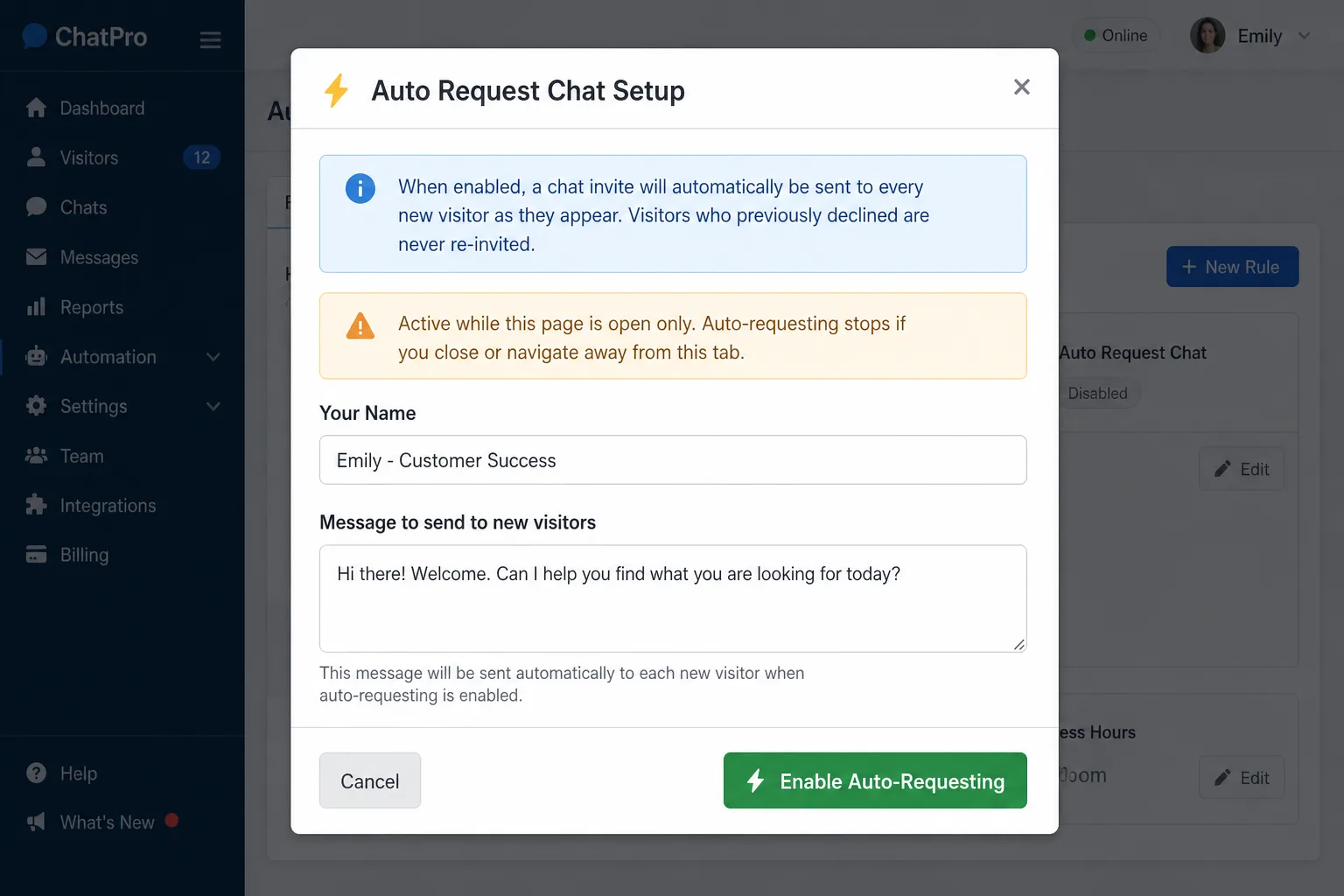
Combine proactive chat with IMSupporting’s hybrid AI chat workflows for the ultimate visitor engagement toolkit. Set up automated workflow steps that collect visitor details, answer common questions with AI, and seamlessly escalate to a human operator — all triggered by a single proactive invitation.

Whether your operator wants to jump straight into a live conversation or let a workflow qualify the visitor first, IMSupporting gives you complete flexibility over how each proactive engagement plays out.

Start Engaging Your Website Visitors Proactively

See who’s on your site, send personalised invitations at the perfect moment, and turn browsers into buyers. Free 30-day trial, no credit card required, UK hosted.

UK hosted & GDPR compliant  ·  Secure & encrypted  ·  Support included